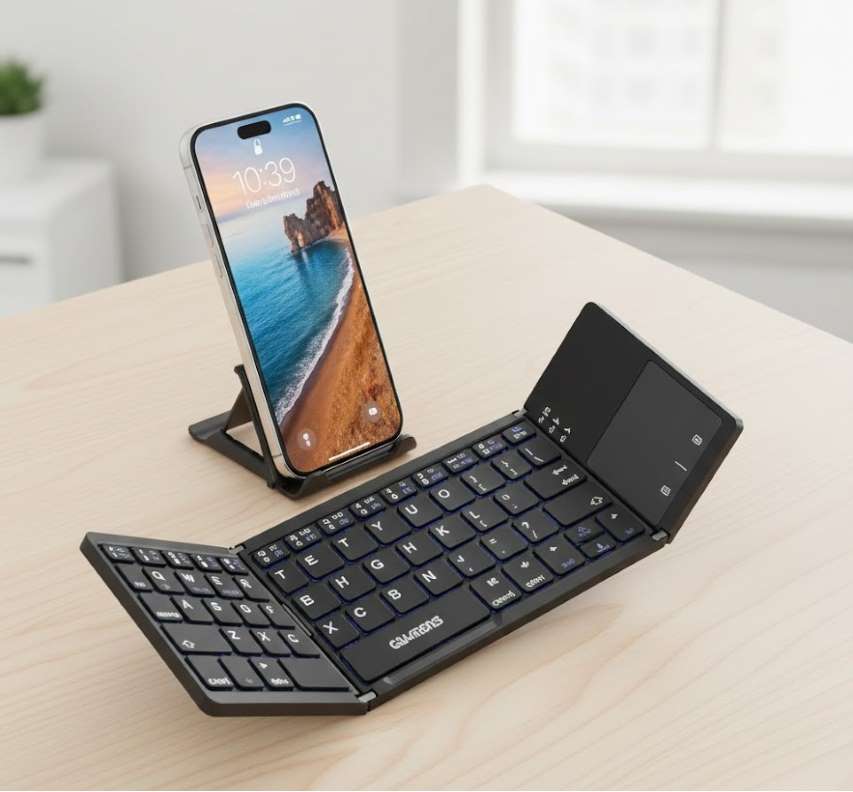
Evolution of Portable Input
The Foldable Bluetooth Keyboard represents a significant advancement in mobile computing peripherals, bridging the gap between the portability of a smartphone or tablet and the tactile efficiency of a full-sized keyboard. By ingeniously incorporating hinges or flexible materials, these devices collapse into a compact, pocketable form factor without sacrificing the essential typing experience. They are the ultimate accessory for digital nomads, students, professionals, and anyone who needs to produce substantial content away from a traditional desk setup.
Core Design & Mechanism
The fundamental innovation lies in the folding mechanism, which allows the keyboard to reduce its footprint by 50% or more.
Bi-Fold (Clamshell) Design: The most common type. The keyboard splits into two or three panels that fold together like a book, often with a protective case that doubles as a stand for your device.
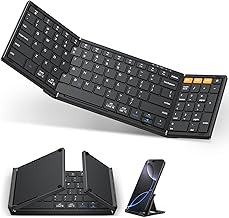
Tri-Fold Design: Divides the keyboard into three sections, allowing for an even more compact folded size while often maintaining very standard key spacing when open.
Flexible/Rollable Design: Utilizes a soft, silicone-like material over a flexible circuit board. These keyboards can be rolled or folded with minimal risk of damage and are often spill-proof.
Magnetic Closure & Alignment: High-quality models use magnets to ensure the keyboard halves align perfectly when folded and stay securely closed.
Key Advantages & Benefits
Advantage | Detailed Benefit |
|---|---|
| Ultimate Portability | Transforms from a full-sized keyboard (often 78-100 keys) into an object the size of a large smartphone or wallet, easily fitting into a jacket pocket, small pouch, or the front of a backpack. |
| Enhanced Productivity | Provides a physical keyboard's speed, accuracy, and tactile feedback for writing emails, documents, code, or scripts on a touchscreen device, dramatically improving workflow. |
| Multi-Device Connectivity | Pairs via Bluetooth with up to 3 devices (e.g., phone, tablet, laptop) and allows quick switching between them, centralizing control. |
| Ergonomic Improvement | Allows you to position your mobile device at eye level (using its own case or a separate stand) while typing with your hands in a natural, relaxed position, reducing neck and shoulder strain. |
| Extended Battery Life | Due to efficient Bluetooth Low Energy (BLE) chips and automatic sleep/wake functions, batteries can last weeks or even months on a single charge with typical use. |
| Universal Compatibility | Works with all major operating systems: iOS, iPadOS, Android, Windows, macOS, and even some smart TVs and gaming consoles. |
Primary Use Cases & Ideal Users
The Digital Nomad & Remote Worker: For typing in cafes, co-working spaces, airports, or hotel rooms without carrying a bulky laptop.
The Student: Perfect for taking notes in class on an iPad or writing papers in the library without the weight of a full laptop.
The Content Creator & Journalist: Enables rapid writing, blogging, or social media management directly on a mobile device while on location.
The Gaming Enthusiast: Used for chat or certain game controls on mobile gaming setups or with portable consoles.
The Smartphone Power User: For individuals who use smartphone desktop modes (like Samsung DeX or Motorola Ready For) to create a full workstation with a monitor.
The Traveler: A lightweight tool for writing travel journals, planning itineraries, or communicating without a laptop.
Key Features & Specifications to Evaluate
Build Quality & Materials:
Frame: Anodized aluminum offers premium durability and feel; high-grade ABS plastic is lightweight and cost-effective.
Key Switches: Scissor-switch mechanisms are standard, offering low travel and quiet operation. Feel can range from mushy to pleasantly crisp.
Surface: Keys can be chiclet-style (island) with laser-etched or double-shot legends for longevity.
Connectivity & Battery:
Bluetooth Version: 5.0 or higher is ideal for better range, stability, and energy efficiency.
Battery: Built-in Li-Po battery (300-500mAh). Look for USB-C charging. Battery life is typically 20-100 hours of active use.
Typing Experience:
Key Layout & Size: Some retain nearly full-size keys (18-19mm center-to-center), while others are more compact. Dedicated iOS/Android function keys (Home, Search, Volume) are a major plus.
Key Travel: The distance a key depresses (usually 1-2mm). More travel generally feels better but can increase thickness.
Additional Features:
Backlighting: Useful for typing in low-light conditions, though it reduces battery life.
Integrated Device Stand: A built-in groove or folding cover to hold your phone or tablet at a comfortable viewing angle.
Auto Sleep/Wake: The keyboard automatically enters ultra-low-power sleep mode when folded or idle, and wakes upon opening or a keypress.
Water/Dust Resistance: Important for travelers and outdoor use (rated IPX4 or higher).
ypes & Variations
By Size & Layout: Ultra-compact (60-70%), Standard Foldable (78-90 keys), Full-size with Numpad.
By Material: Hard-shell (plastic/metal), Flexible Silicone.
By Specialization: Gaming-oriented (with specific key mappings), Multi-lingual (with specific language legends).
Selection Guide: Choosing the Right Model
Consideration | Key Questions | Recommendations |
|---|---|---|
| Primary Device & OS | What device will you use most? Do you need OS-specific shortcut keys? | Ensure advertised compatibility. Look for keyboards with dedicated emoji, screenshot, or voice dictation keys for your platform. |
| Typing Frequency & Feel | Will you type for hours daily, or just occasionally? How important is key feel? | If for heavy use, prioritize key spacing and travel. Read reviews specifically about typing comfort. Consider a slightly larger foldable. |
| Portability vs. Size | What is your absolute maximum folded size? Are you willing to trade some compactness for better keys? | Measure your bag's pocket. Tri-fold are most portable; bi-fold often offer a better typing experience. |
| Durability Needs | Will it live in a backpack with other items? Do you need spill resistance? | Aluminum frames are tougher. Ensure the hinge feels robust. For extreme conditions, consider a flexible silicone model. |
| Budget & Features | Are backlighting, a premium case, or an integrated trackpad necessary? | Core typing functionality is excellent even in budget models. Pay more for build quality, specific layouts, and premium materials. |
Operation, Pairing & Maintenance Tips
Initial Pairing: Enable Bluetooth on your device. Power on the keyboard (often a switch on the side) and put it in pairing mode (usually by holding the Bluetooth button). Select the keyboard from your device's Bluetooth menu.
Multi-Device Switching: Most keyboards allow pairing with 2-3 devices. Switch between them using a dedicated key combination (e.g., Fn+1, Fn+2).
Optimizing Battery Life: Turn off backlighting when not needed. Ensure the auto-sleep function is enabled. Fully charge before a long trip.
Cleaning & Care: Power off before cleaning. Use compressed air to remove crumbs from under keys. Wipe surfaces with a slightly damp lint-free cloth. Never submerge hard-shell keyboards unless they are specifically rated for it.
Storage: Fold it properly along its intended hinges. Store in its protective case or a clean, dry compartment to prevent scratches and hinge damage.
Unleashing Mobile Potential
A Foldable Bluetooth Keyboard is more than just a gadget; it is a productivity multiplier and an ergonomic liberator. It elegantly solves the fundamental conflict between portability and functionality, allowing users to harness the full computing power of their mobile devices for serious creation and communication. By choosing a model that aligns with your specific usage patterns, ergonomic preferences, and portability requirements, you invest in a tool that seamlessly integrates into a dynamic, on-the-go lifestyle, ensuring you are always prepared to type at your best, anywhere.
 |  |  |
 |  |  |