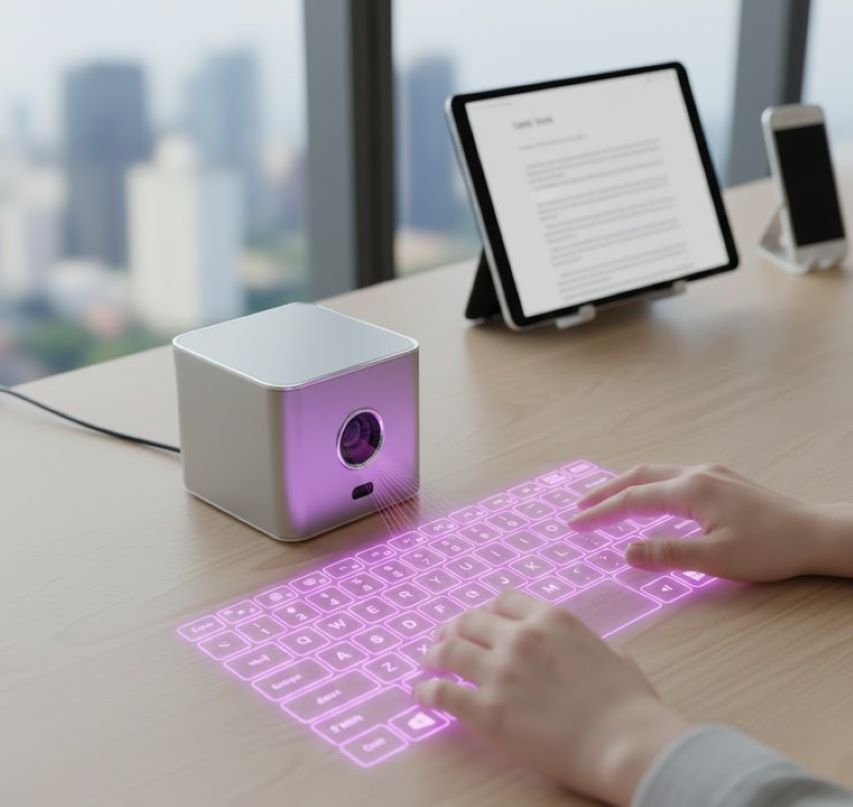
A Virtual Laser Projectation Keyboard (VLPK) is a form of input device that projects a full-size QWERTY keyboard layout onto any flat surface using a pattern of red or infrared laser light. It uses sensor technology to detect finger movements as the user "types" on the projected image, translating these motions into keystrokes that are sent wirelessly to a paired smartphone, tablet, or computer.
It represents a convergence of optics, sensor technology, and human-computer interaction, creating a portable, space-saving, and futuristic alternative to physical keyboards for mobile devices.
Historical Context & Evolution
The technology emerged in the early 2000s, popularized by companies like Celluon and Canesta. It was initially showcased as a groundbreaking "see-through" interface. While it has not replaced physical keyboards due to inherent limitations, it remains a staple of sci-fi aesthetics and a practical niche tool for ultra-mobile computing, augmented reality (AR) setups, and specific professional environments where sterility or space is at a premium.
Core Technology & How It Works
The system operates through a meticulously synchronized two-component process: Projection and Sensing.
The Projection Module
Light Source: A diffractive optical element (DOE) or a simple lens system is used with a single laser diode (typically red).
Process: The laser beam is scattered and shaped into a precise, predefined keyboard pattern (approx. 295mm x 95mm).
Output: A crisp, red-hued keyboard layout appears on the surface. The projection is harmless to eyes at its low power output.
The Sensing Module (The "Brain")
This is the most critical and complex part. It tracks finger interactions.
Infrared (IR) System: An infrared laser or LED projects an invisible grid of light parallel and just above (<1cm) the visible keyboard plane.
IR Camera/Sensor: A specialized CMOS camera or photodetector, filtered to see only infrared light, continuously monitors the projected IR plane.
The Interaction: When a finger breaks the plane of the IR light grid to "press" a projected key, it reflects IR light back towards the camera. The sensor detects this specific interruption in the grid.
Processing: An onboard processor (often an ASIC) uses triangulation or shadow recognition algorithms to calculate the X, Y, and Z coordinates of the finger tap with high precision, determining exactly which "key" was pressed.
Output: The processor translates this coordinate data into a standard HID (Human Interface Device) keyboard scancode (e.g., the letter "A") and transmits it via Bluetooth to the host device.
Key Components & Specifications
Component | Description & Purpose |
|---|---|
Laser Diode (Visible) | Projects the visible red keyboard layout. |
| Diffractive Optical Element (DOE) | Shapes the laser into the keyboard pattern. The heart of the projection. |
Infrared Emitter | Creates the invisible sensing plane above the projection. |
IR CMOS Sensor/Camera | Captures finger interruptions in the IR plane. |
Processing Unit (ASIC/MCU) | Runs the detection algorithms and manages data I/O. |
Bluetooth Radio | Enables wireless connection to smartphones, tablets, PCs, and smart TVs. |
Rechargeable Battery | Typically Li-ion, providing 2-4 hours of continuous use. |
Micro-USB / USB-C Port | For charging and sometimes wired operation. |
Typical Specs:
Projection Size: ~ 295 x 95 mm (Standard keyboard size)
Connection: Bluetooth 3.0/4.0/5.0
Compatibility: iOS, Android, Windows, macOS
Battery Life: 2-4 hours (120-180 min continuous typing)
Charge Time: 2-3 hours
Weight: 50-80 grams
User Experience: The "Typing" Reality
Tactile Feedback: None. This is the single greatest drawback. Users rely on visual and sometimes auditory feedback (simulated click sounds from the host device).
Learning Curve: Requires practice to achieve accuracy. Muscle memory from physical keyboards doesn't fully translate.
Typing Speed: Maxes out at a fraction of speed on a physical keyboard. Suitable for short emails, URLs, or commands, not for long-form writing.
Environment Requirements: Needs a flat, non-reflective, and preferably matte surface. Glass, glossy tables, or uneven textures disrupt both projection and sensing. Ambient light (especially direct sunlight) can wash out the projection.
Advantages & Benefits
Extreme Portability: Fits in a pocket, turning any surface into a workspace.
Space-Saving & Minimalist: Eliminates the need to carry a physical keyboard for tablets or smartphones.
Hygienic & Easy to Clean: No physical keys to accumulate germs; simply wipe the device.
Cool Factor & Presentation: High visual appeal for demonstrations and public use.
Device Consolidation: Can pair with multiple devices and switch between them.
Specialized Use Cases: Valuable in sterile labs, industrial settings, or for users with certain physical limitations where a flat, cleanable interface is beneficial.
Limitations & Drawbacks
Lack of Tactile Feedback: Major barrier to speed and accuracy, leading to fatigue.
Environmental Sensitivity: Fails in bright light, on unsuitable surfaces, or if the device is bumped.
Ergonomics: Requires holding hands in a "hovering" position, which can be uncomfortable over time (similar to "gorilla arm" syndrome with touchscreens).
Battery Dependency: Another device to charge.
Typing Noise: In quiet environments, the audible tapping of fingers on a hard table can be disruptive.
Limited Functionality: Difficult to use key combinations (like Ctrl+Alt+Del) or perform fast gaming commands reliably.
Applications & Ideal Use Cases
Mobile Professionals: For sending quick emails or messages on a smartphone or tablet while traveling.
Augmented/Virtual Reality: As an input method in AR environments where a physical keyboard is impractical.
Industrial & Medical Fields: In cleanrooms, workshops, or hospitals where sterile, sealable interfaces are needed.
Home Entertainment: As a convenient remote for typing on smart TVs, streaming boxes, or gaming consoles.
Accessibility Tool: For some users with motor disabilities who find a flat, large projection easier to target than small physical keys.
Educational & Demonstrative Tool: To showcase human-computer interaction technology.
The Future & Technological Convergence
The virtual keyboard is evolving:
Advanced Haptics: Research into using ultrasonic waves to simulate tactile feedback on empty air.
AI-Powered Prediction: Better error correction and word prediction to compensate for typing inaccuracy.
Integration into Devices: Built directly into future smartphones or wearables, eliminating the separate dongle.
3D Sensing: Using more advanced depth sensors (like miniature LiDAR) for more robust and gesture-capable interaction.
The Virtual Laser Projection Keyboard is a triumph of optical and sensor engineering that delivers a functional, space-age input method. However, it remains a niche solution rather than a mainstream replacement, constrained by the fundamental human need for tactile feedback and its sensitivity to environment.
Its value is greatest in specific scenarios where portability and novelty trump typing speed and comfort. It serves as a powerful reminder that for most users, the physical keyboard—with its reliable tactile response—remains an unsurpassed interface for serious input, while projection keyboards illuminate the path toward more ambient and invisible forms of computing interaction.
 |  |  |